Alarms
Set one with alarm 7am. A bell sits by the time, and it rings until you stop it.
A Dynamic Island for Windows.
Time, music, timers and live stats in one small pill at the top of your screen. Hover, and it opens.
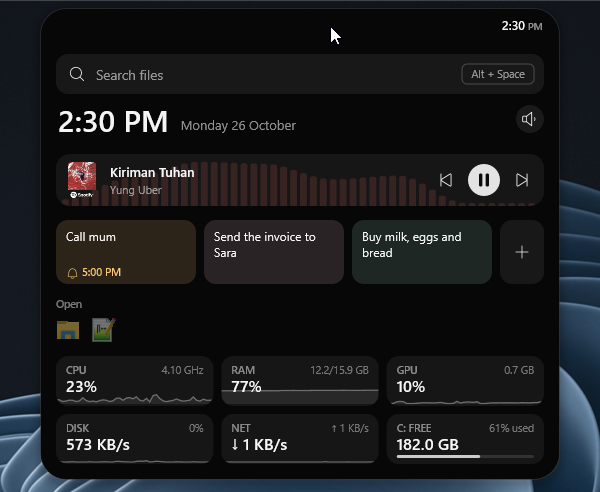
The pulsebar pill at the top of a screen, showing album art and a moving equaliser, opens into its panel with a search field, the time, the music player, notes, open apps and system stats, then closes again.
Press Alt + Space anywhere. Open apps and settings, find files on every drive, or just type what you want, like timer 5m.
A new song slides in with its cover. Then the pill keeps the art and a visualiser that follows the actual sound, from bass to treble.
Alt + Shift + S freezes the screen: drag an area, click a window, or take it all. It’s copied straight away, and one click opens it for markup.
Browser tabs under the island? It melts into a thin line so you can click them. Rest on the line to bring it back.
The little jobs you’d open an app for, a keystroke away.
Set one with alarm 7am. A bell sits by the time, and it rings until you stop it.
Type note call mum at 5pm. Notes sit in the panel, and reminders ring right on time.
Pin CPU, memory, GPU, disk, network or free space to the pill. Spikes show up on their own, then leave.
A full drive, low battery, a busy CPU: the island tells you once, then gets out of the way.
Written in Rust on the Windows APIs. No Electron, no hidden browser, no background service.
Pick a screen in Settings, or drag the island there, portrait ones too. It lists that screen’s apps, so a side monitor without a taskbar still has one.
RM39.90
About US$9.80. Checkout shows it in your own currency.
You get 24 hours of real use with every feature. The clock only runs while pulsebar is open and you’re using your PC, so leaving it on overnight doesn’t use up your trial.
Only what the licence needs. During the trial it sends an anonymous ID for your PC and how much trial time you’ve used, so reinstalling doesn’t restart it. When you activate, your key is checked with Lemon Squeezy, who handle payments, and checked again about once a week. The visualiser listens on your PC only. Nothing is recorded or uploaded. Read the privacy policy.
Windows 10 and Windows 11, 64-bit.
Yes. On the old PC, open Settings (right-click the island), go to Licence and choose Deactivate. Then enter your key on the new one.
Ask for a refund within 14 days of buying and you’ll get your money back. Read the refund policy.